RSS feed: Daily tech news Daily tech news
  • Scientists catch a hidden electronic state forming in just 30 femtoseconds
    Scientists watched a light-triggered hidden state form inside a material in only 30 femtoseconds, revealing a step that had never been seen before. The material first entered a fleeting electronic state in which its bonds reorganized in a repeating pattern, followed by tiny atomic shifts. This ultrafast pathway could offer a new way to control […]
  • MIT physicists discover electrons rebuilding like ice inside a quantum material
    MIT physicists found that two electronic phases inside the same quantum material emerge through surprisingly different mechanisms—one smoothly and the other in expanding pockets resembling growing ice crystals. The discovery could help explain how exotic properties such as superconductivity and magnetism develop and coexist.
  • Tiny quantum engines reveal useful energy hiding in “waste heat”
    A tiny machine made from just an atom and particles of light may sound impossibly simple, but it raises a surprisingly difficult question: what counts as heat, and what energy can still do useful work? University of Basel researchers have developed a theoretical framework that brings quantum physics and thermodynamics into better agreement for these […]
  • Tiny graphene wrinkles create surprisingly powerful electrical effects
    Scientists have discovered that tiny, sharply curved wrinkles in graphene can dramatically alter its electrical behavior, creating surprisingly strong charge separation. The finding suggests future electronics could be tuned by reshaping materials at the atomic scale instead of changing what they’re made of.
  • Ordinary WiFi can now identify you with near-perfect accuracy
    Ordinary WiFi networks could quietly become powerful surveillance tools, allowing people to be identified without cameras, special sensors, or even carrying a connected device. Researchers showed that unencrypted signals routinely exchanged between WiFi devices and routers can be used to create radio-based images of people and recognize them within seconds. In tests involving 197 participants, […]
  • Chemists set electrons free and break a decades-old chemistry barrier
    Chemists have developed a catalyst that breaks a long-standing rule governing which molecules receive electrons during chemical reactions. By releasing electrons directly into solution, the technique could unlock reactions—and potentially useful new molecules—that were previously out of reach.
Figures and tables list

Dissertation Figure and Table List | Tips and Examples

by Florius

The list of figures or tables is part of the series on how to write your dissertation and it should be placed immediately following the table of contents in your dissertation. This list should include all figures or tables used in the document, along with their captions and corresponding page numbers. While these lists are not required, they can make the overall document more organized and easy to navigate. Additionally, be sure to provide descriptive captions for each figure or table, such as “High Field Quasi-Optical Experimental Setup” instead of simply “Experimental Setup.”

1. How to create a list of figures in Word

To create a list of figures, tables or even equations in MS Word, can be difficult if you do not know where to look. Below I explain with figures and text how to make your own list. For additional information, please consult the website of Microsoft Office.

  • Place the cursor on the top of the page where you want the list of figures/tables to be.
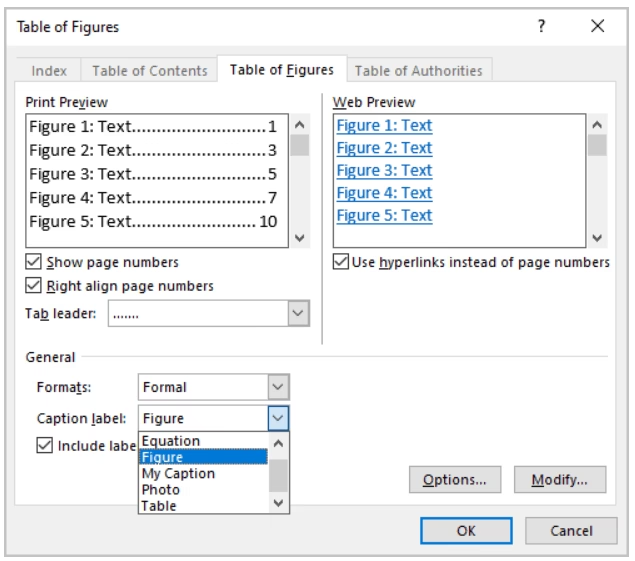
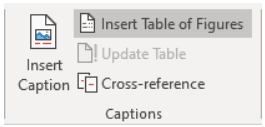
  • Go to References > Insert Table of Figures (Even if you want to make a list of tables or equations).
How to create a list of figures.
  • In the dialog box, select the label for which you want to make the list from the “Caption Label Pulldown” (this can be Equation, Figures, Tables).
  • You can change the formatting in the same dialog box to Formal.
How to create a list of figures.

2. Example

LIST OF FIGURES

Figure 1. Flowchart of the research methodology……………………………………………………………………………………………1

Figure 2. Bar graph illustrating the relationship between X and Y variables……………………………….2

Figure 3. Scatterplot showing the correlation between A and B…………………………………………………………..3

Figure 4. Schematic diagram of the experimental setup…………………………………………………………………………4

Figure 5. Pie chart representing the distribution of survey responses……………………………………………5

Figure 6. Line graph depicting the trend of the data over time…………………………………………………………….6
Leave a comment

This site uses Akismet to reduce spam. Learn how your comment data is processed.

Categories
Instagram