



This guide on APA referencing is based on the 7th Edition of the APA manual. We will discuss the APA formatting: The general guidelines and the 3 of the 4 major pages (excluding the main body text).
I’d recommend to read the other posts if you require more details and more examples on each topic:
1. General guidelines
Start with white 8.5 x 11 inch paper, and use 1 inch margin on all sides. All body text throughout the paper should be double-spaced. For professional papers a page header is required that shows the paper title and the page number. For students a page header is also required, but only page numbers should be shown.
In the page header, the page numbers should be flushed to the right, and the title (if required) should be flushed to the left. The title can not be more than 50 characters.
You should use appropriate legible fonts, even though there is no rule, 12-point Times New Roman, 11-point Georgia and 11-point Arial are permitted.
Title page
In APA7 there is a slight difference between professional papers and student papers.
On the title page, it should include the title of the paper, the author’s name and any affiliations. A professional paper should include an author’s note. A student paper should include the course number and name, supervisor’s name and assignment due date.
APA reccomends that the title of the page should be centered and boldfaced, preferably without any abbreviations. Furthermore, your title should be no more than 2 lines of text.
The author’s name should be written under the title in the center as well. It is done in a reversed order with the surname first, followed by the initials. Any titles such as Dr., Prof., etc. should not be used.
The affiliation to the university should be underneath the author’s name and should be where the research was done.
The author’s note (professional paper only) should be at the bottom half of the page underneath the affiliations in the center. It should include the name of the author, ORCID iD and the ORCID url. In the second part of ur author’s note, it should be identified if any author has changed his affiliation. In the third part there should be any acknowledgements.
Note: The page header should also be included on the title page.
Abstract
The abstract should start on a new page with the title Abstract on top in the center and bold. On a new line, a summary of the main body can be written that details the key points of your research (NO indent!). It should be a single paragraph with a maximum of 250 words.
It is possible to add a keyword list in your abstract. To do this, indent a new line and write Keywords: (in italics) and list all your keywords that you want to display.
Note: The page header should also be included on the abstract page
Reference list
After the main text (including the conclusion), you should add your reference list. It provides all the necessary information to locate and find the reference you cited in the main text. You only list the references you used in the text.
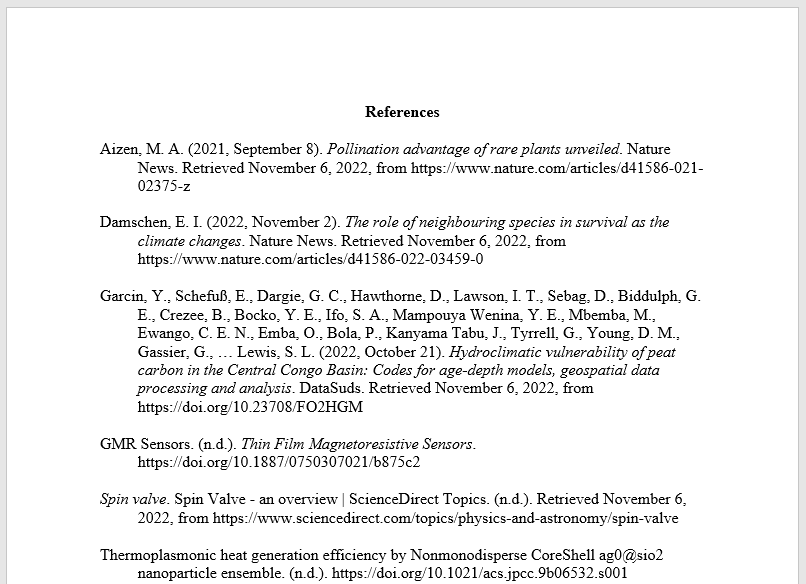
On a new page write References in bold and centered at the top of the page. All the text should be double-spaced as you have done in the rest of your report as well.
- The lines after each entry should be indented.
- On the next line, you can start listing your references in alphabetical order (by the surname of the authors, or the first word of the title if the author is unknown, and by omitting words such as “The”, “An” and “a”.
- All author names should be reversed (surname first, than initials).
- If there are multiple authors with the same name, list them by date. If they also have the same date, add an additional a,b,c,etc to the reference and in-text citation.
- For multiple authors, list them, up to 20 authors! Put an ampersand before the last author’s name.
- Italicize titles of longer works (books, newspaper names, etc).
- do NOT italicize, underline around titles of shorter works, such as chapter of books or articles in a journal.
2. Full page example
If you are interested in referencing styles, see our other resources, including the IEEE reference style for engineers and the MLA reference style for arts and humanity studies. You can also check out our information page on References and citations to get a better understanding of the whole topic. All of the resources can be found in our Database.
References & Links
[[references]]
You may also like