RSS Daily tech news
  • A strange in-between state of matter is finally observed
    When materials become just one atom thick, melting no longer follows the familiar rules. Instead of jumping straight from solid to liquid, an unusual in-between state emerges, where atomic positions loosen like a liquid but still keep some solid-like order. Scientists at the University of Vienna have now captured this elusive “hexatic” phase in real […]
  • New catalyst makes plastic upcycling 10x more efficient than platinum
    Scientists are finding new ways to replace expensive, scarce platinum catalysts with something far more abundant: tungsten carbide. By carefully controlling how tungsten carbide’s atoms are arranged at extremely high temperatures, researchers discovered a specific form that can rival platinum in key chemical reactions, including turning carbon dioxide into useful fuels and chemicals. Even more […]
  • Engineers just created a “phonon laser” that could shrink your next smartphone
    Engineers have created a device that generates incredibly tiny, earthquake-like vibrations on a microchip—and it could transform future electronics. Using a new kind of “phonon laser,” the team can produce ultra-fast surface waves that already play a hidden role in smartphones, GPS systems, and wireless tech. Unlike today’s bulky setups, this single-chip device could deliver […]
  • An old jeweler’s trick could change nuclear timekeeping
    A team of physicists has discovered a surprisingly simple way to build nuclear clocks using tiny amounts of rare thorium. By electroplating thorium onto steel, they achieved the same results as years of work with delicate crystals — but far more efficiently. These clocks could be vastly more precise than current atomic clocks and work […]
  • Critical minerals are hiding in plain sight in U.S. Mines
    Researchers found that U.S. metal mines already contain large amounts of critical minerals that are mostly going unused. Recovering even a small fraction of these byproducts could sharply reduce dependence on imports for materials essential to clean energy and advanced technology. In many cases, the value of these recovered minerals could exceed the value of […]
  • Miracle material’s hidden quantum power could transform future electronics
    Researchers have directly observed Floquet effects in graphene for the first time, settling a long-running scientific debate. Their ultrafast light-based technique demonstrates that graphene’s electronic properties can be tuned almost instantaneously. This paves the way for custom-engineered quantum materials and new approaches in electronics and sensing.
Figures and tables list

Dissertation Figure and Table List | Tips and Examples

by Florius

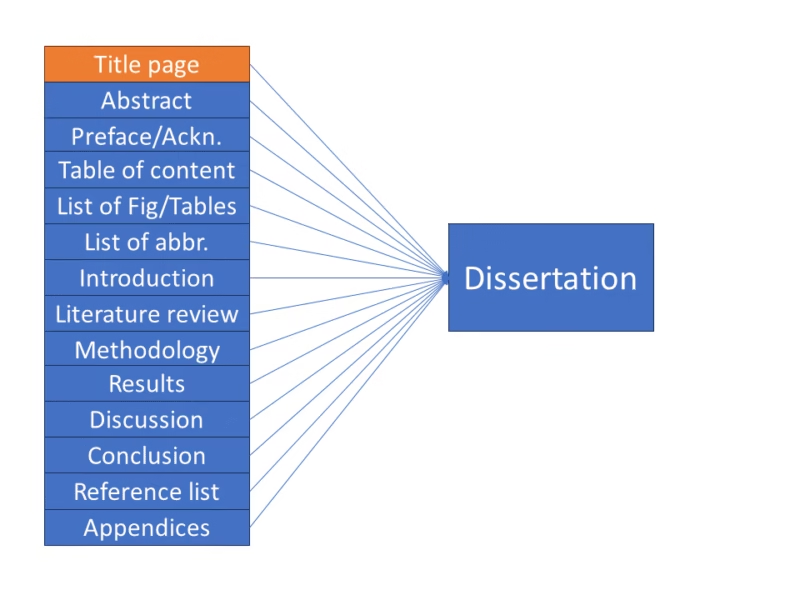
The list of figures or tables is part of the series on how to write your dissertation and it should be placed immediately following the table of contents in your dissertation. This list should include all figures or tables used in the document, along with their captions and corresponding page numbers. While these lists are not required, they can make the overall document more organized and easy to navigate. Additionally, be sure to provide descriptive captions for each figure or table, such as “High Field Quasi-Optical Experimental Setup” instead of simply “Experimental Setup.”

1. How to create a list of figures in Word

To create a list of figures, tables or even equations in MS Word, can be difficult if you do not know where to look. Below I explain with figures and text how to make your own list. For additional information, please consult the website of Microsoft Office.

  • Place the cursor on the top of the page where you want the list of figures/tables to be.
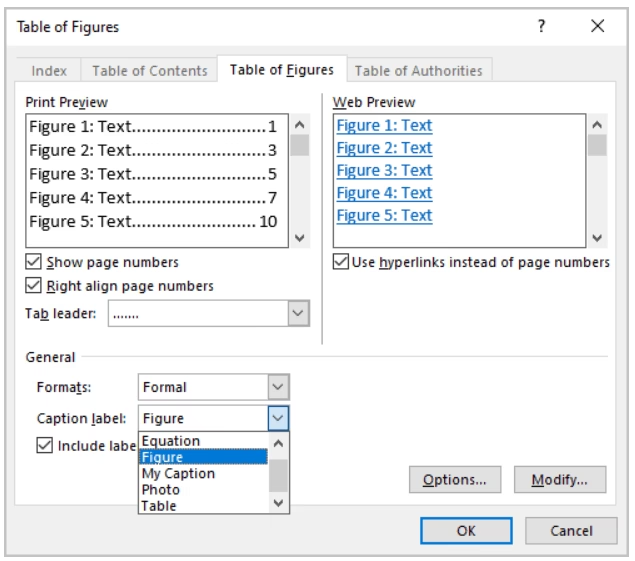
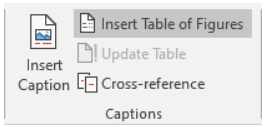
  • Go to References > Insert Table of Figures (Even if you want to make a list of tables or equations).
How to create a list of figures.
  • In the dialog box, select the label for which you want to make the list from the “Caption Label Pulldown” (this can be Equation, Figures, Tables).
  • You can change the formatting in the same dialog box to Formal.
How to create a list of figures.

2. Example

LIST OF FIGURES

Figure 1. Flowchart of the research methodology……………………………………………………………………………………………1

Figure 2. Bar graph illustrating the relationship between X and Y variables……………………………….2

Figure 3. Scatterplot showing the correlation between A and B…………………………………………………………..3

Figure 4. Schematic diagram of the experimental setup…………………………………………………………………………4

Figure 5. Pie chart representing the distribution of survey responses……………………………………………5

Figure 6. Line graph depicting the trend of the data over time…………………………………………………………….6
Leave a comment

This site uses Akismet to reduce spam. Learn how your comment data is processed.